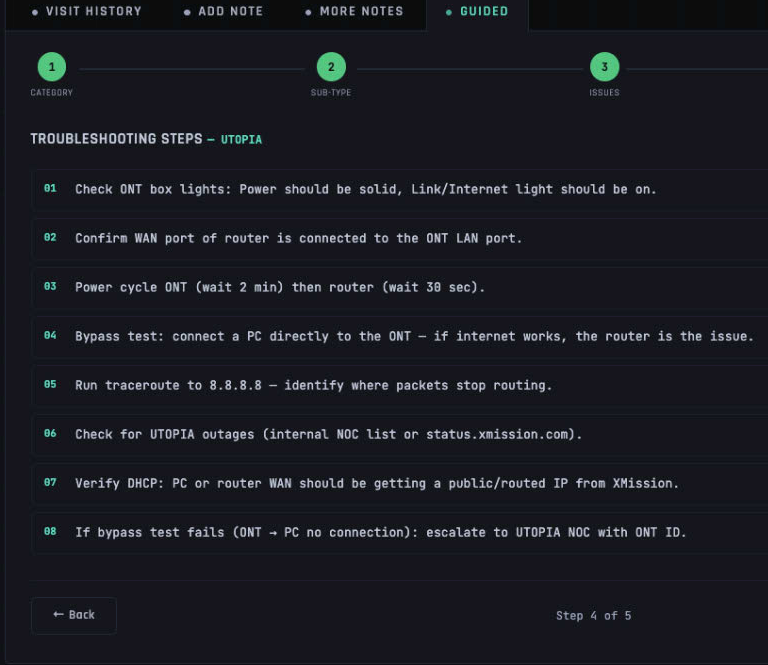
Ever felt like you're trapped in an endless loop while trying to fix something on your computer? Remember the days of AOL, where a simple call to tech support could turn into a Sherlock mystery-solving adventure? Well, it’s time to bring that excitement back with a choose-your-path troubleshooting tool. This isn't just about fixing bugs; it's about making the process fun and engaging.
Imagine being on the phone with a customer who's lost in the digital woods, not knowing which direction to turn next. That's where our new troubleshooting tool comes in handy. It’s designed to guide them through a series of decisions that lead to solutions, much like how you'd navigate your way through an old-school Choose Your Own Adventure book.
But why stop at just fixing the issue? This tool is about education too. By letting customers explore different paths, they learn what works and what doesn’t. It's a bit like teaching them to fish instead of giving them a fish every time they need help. The goal is to empower our users by equipping them with knowledge.
Let's dive into how we can make this happen:
The Blueprint: Designing the Tool
Our tool will start with a clear, concise problem statement. “Your internet isn’t working.” Then comes the first decision point. Should you try restarting your modem or checking if all cables are securely connected? Each choice leads to a new scenario, guiding users closer to resolution.
But here's the twist: at each step, we'll sprinkle in some humor and personality. Remember how much fun it was talking to our tech support team back when AOL reigned supreme? That’s what we want to recreate. With playful prompts like “Have you unplugged everything yet?” or “Let's do a quick dance around your router and see if that helps,” we make the experience less daunting.
Personalization: Making It Work for Everyone
We all know tech issues can hit at any time, whether it’s during Netflix binge nights or early Sunday mornings. So our tool needs to be ready anytime and anywhere. With mobile-first design considerations, users can troubleshoot on the go.
Also, we’re not just targeting beginners here. Advanced users love quick fixes too. By offering shortcuts for power-users along with detailed steps for novices, everyone finds what they need. That means less time spent waiting and more time enjoying life!
Beyond the Basics: Enhancing the Experience
Once you’ve worked through your issue, our tool doesn't just vanish into thin air. We track progress and offer follow-up tips or tutorials that can help prevent similar problems down the line. Think of it as a long-term relationship rather than a one-night stand.
In addition, we'll connect users with our community forums where they can share their experiences or seek advice from other tech-savvy individuals. It's like having a personal support network at your fingertips.
Final Thoughts
Designing this choose-your-path troubleshooting tool isn't just about solving problems; it’s about creating memorable, engaging experiences that make our users feel valued and supported. So next time you're stuck, don't panic — take a deep breath, pick your path, and let the adventure begin.
What kind of troubleshooting scenarios do you think would benefit most from this interactive approach?
// no comments on this post.